
How to let employees use AI without leaking data
Banning AI doesn't stop people using it. Here's a practical way to give employees an AI agent while keeping keys, files, and prompts where they belong, and how Glaux is built to do it.
Here’s a scene most security leads will know.
An analyst has a messy spreadsheet and a deadline. The company hasn’t approved an AI tool yet. So she pastes the sheet into a personal chatbot account on her phone. The work gets done. Nobody finds out. And now customer data sits in an account you don’t control, under terms you never read.
She isn’t being careless. She’s being productive with the tools she has. That’s the real problem. When the safe path doesn’t exist, people take the fast one.
So the question isn’t “should employees use AI?” They already do. The question is how to give them a path that’s just as fast and doesn’t leak. This post walks through how we think about that, and how we built Glaux around it.
Where leaks actually happen
When people say “AI data leak,” they usually picture a model training on their secrets. That’s one risk. In practice, most exposure comes from plainer places:
- Personal accounts. Company data goes to a provider under a consumer agreement, outside your contracts and your logs.
- Keys on laptops. A developer puts a provider API key in a config file to get started. It gets copied, synced, and committed.
- Tools with too much reach. An agent connected to email, drives, or a CRM can move data anywhere those tools can.
- Logs that hold too much. Observability is great until your trace store becomes a second copy of every prompt and file.
- No record of who did what. When something goes wrong, nobody can say which person, which agent, or which rule allowed it.
Good AI governance closes all five. Blocking websites closes, at best, the first one.
The idea: one path, and everything on it is checked
The design principle is simple. Give people one sanctioned way to use AI, and make every step on that path checked by the server, not by the laptop.
Here’s what that looks like for a single request in Glaux.
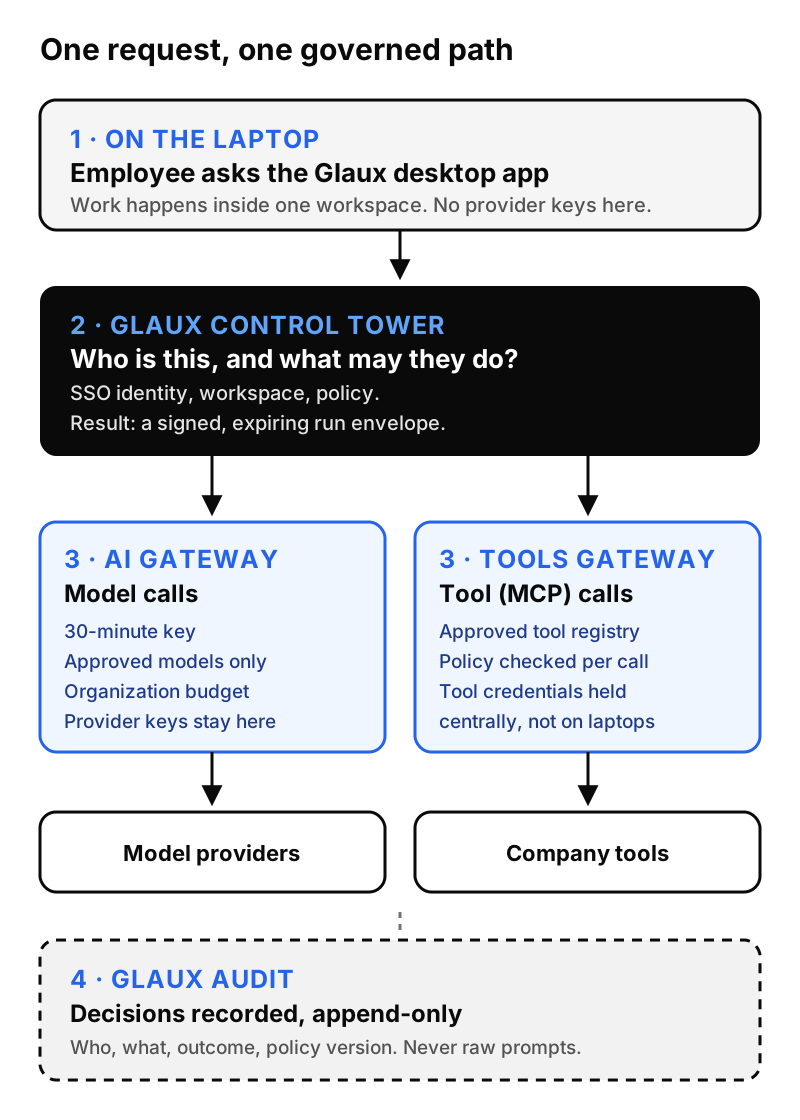
Let’s walk through it.
1. The employee works in a desktop agent, inside a workspace
People use Glaux through the Glaux desktop app, an AI agent that runs on their laptop. Work happens inside a workspace, and the desktop app holds no provider keys, no arbitrary model URLs, and no direct links to random tools. Those are deliberately left out.
That last part matters. If the laptop can’t reach a model on its own, there’s nothing to misconfigure and nothing to steal.
2. Glaux Control Tower decides who this is and what they may do
Before any work starts, Glaux Control Tower answers two questions on the server.
Who is this? People sign in through your existing identity provider using single sign-on (SSO). Control Tower maps that sign-in to its own record of the person. Group names or roles that arrive from the identity provider don’t grant anything by themselves. Access comes from what an administrator assigned in Glaux.
What may they do? Control Tower evaluates your policy. The answer isn’t just yes or no. It can be allow, allow-but-ask-a-person, deny with a way to request access, or a hard no. (We cover those in detail in our policy checklist post.)
The result is a signed, expiring “run envelope.” Think of it as a permission slip for this session. It’s tied to the person, the workspace, the session, and the policy version, and it lists exactly what they’re allowed to do. If it’s missing, expired, or revoked, the work doesn’t start. We call this failing closed, and it’s the default everywhere in Glaux.
3a. Model calls go through the Glaux AI Gateway
Every model call goes through the Glaux AI Gateway. A few things happen here that close the “keys on laptops” problem for good:
- Your provider credentials live in the gateway. Administrators add their own provider keys once, in the gateway. Employees never see them.
- People get short-lived keys instead. Control Tower asks the gateway for a virtual key that lasts 30 minutes and is tied to that one session. The desktop app holds it in protected memory. It isn’t written to disk, logs, or crash reports.
- Only approved models are reachable. Administrators pick which providers and models are on. A person can’t point the agent at some other endpoint.
- There’s a spending boundary. Administrators set an organization budget in the gateway, so a runaway loop hits a ceiling instead of a surprise invoice.
3b. Tool calls go through the Glaux tools gateway
Agents get useful when they can reach your tools, and risky for the same reason. In Glaux, tool access over MCP (the Model Context Protocol) runs through the Glaux tools gateway. It keeps the registry of approved tools, holds tool credentials, and checks policy on every call, not just when the tool was first connected. Routing all desktop app tool use through this gateway is in final integration on our side.
4. The decision gets written down
Finally, decisions land in Glaux audit, an append-only store. “Append-only” here isn’t a promise in a slide. The database rejects any attempt to edit or delete an audit row.
What we deliberately don’t collect
A governance tool can become a leak of its own. If your audit log stores every prompt, you’ve just built the most sensitive database in the company.
So Glaux records the decision, not the data.
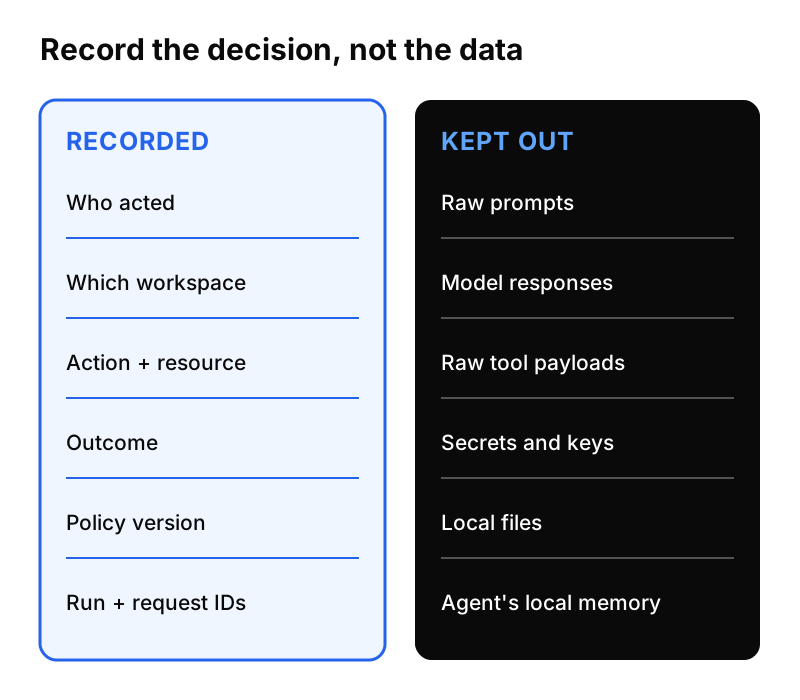
The audit store keeps who acted, where, what they did, the outcome, and which policy version decided it. It does not copy prompts, model responses, raw tool payloads, or credentials. Audit fields are also checked for things that look like secrets, such as API keys, bearer tokens, or cloud access keys, and a record carrying one is rejected rather than stored.
Telemetry follows the same rule. It’s kept bounded and redacted, and the trace viewer opens on “My traces,” so people see their own work by default. The agent’s personal memory stays on the person’s computer.
If you only want the gateway
Some teams aren’t ready for full governance. They just want to stop provider keys from living on laptops and get one bill they can watch.
Glaux has a profile for that, called Local Gateway. The agent, its files, its sessions, and its memory all stay on the person’s computer. The only managed service is the Glaux AI Gateway: approved models, short-lived keys, and an organization budget. New model access stops on logout, revocation, key expiry, or when the budget runs out, while local work stays available.
It’s a smaller promise, and we say so plainly. It doesn’t include the policy, approvals, or audit described above.
Be honest about the edges
One more thing we try hard to be clear about. Glaux can only govern the paths it manages. If someone with admin rights on their own laptop wants to work around local controls, software on that laptop can’t fully stop them. We claim control over brokered paths, meaning the gateway, the tool gateway, and the server-side checks, and we don’t claim more than that.
That’s also why the server, not the laptop, makes every decision that matters.
A practical starting point
If you’re trying to get from “AI is banned” to “AI is safe to use,” here’s a sequence that works with or without Glaux:
- Pick one sanctioned path and make it at least as easy as the personal chatbot.
- Move provider keys into a gateway. Hand out short-lived, scoped keys instead.
- Decide which tools agents may reach, and check every call, not just the setup.
- Log decisions, not content. Your audit trail shouldn’t become your biggest data risk.
- Make “no” useful. Give people a way to ask for access so they don’t go around you.
Do those five and the analyst with the spreadsheet has a better option than her phone. That’s the goal.
Glaux is in its design-partner stage. If you’re working through this at your company, we’d like to compare notes.